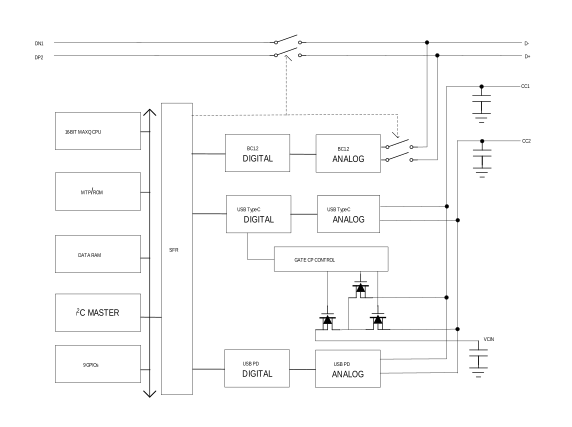
The MAX77958 is a robust solution for USB Type-C CC detection and power delivery (PD) protocol implementation. It detects connected accessories or devices by using Type-C CC detection and USB PD messaging. The IC protects against overvoltage and overcurrent, and detects moisture and prevents corrosion on the USB Type-C connector. The IC also has a D+/D- USB switch and BC1.2 detection to support legacy USB standards. It contains VCONN switches for USB PD and an enable pin for an external VCONN boost or buck converter.
The IC can be used in sink mode to determine the source capabilities of the connected device to optimize power into the sink device. The IC can also be used in source mode to advertise the power capabilities of the source to connected devices and accessories.
The IC is compliant with USB Type-C Version 1.3 and PD 3.0. It can be further customized without affecting the compliance. The embedded default firmware in the MAX77958 is able to support operations that are expected in the Type-C and PD applications.
The default firmware operations are as follows:
BC1.2, Type-C, and PD adapter detection
Automatic PD negotiation
Default sink PDOs: 5V/3A, 9V/3A, and 15V/3A. If there are multiple source PDOs matching to the MAX77958 sink PDO list, the MAX77958 requests the highest power of PDO.
Automatic role setting according to port partner's role
In addition to the default operation, operation of the IC can be customized for specific applications. This is accomplished using the customization script in the evaluation kit (EV kit) GUI to support different Maxim chargers.
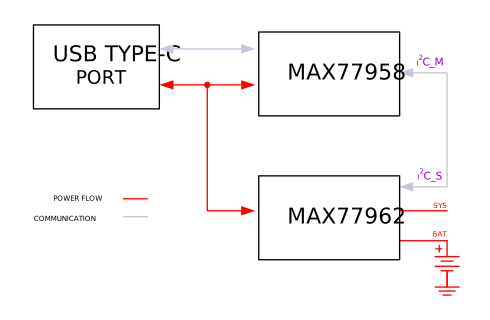
The MAX77958 supports both standalone and MCU based systems. In the standalone system (see Figure 1), the MAX77958 plays a role as system MCU along with the customization script that can be generated through the GUI SW. The customization script is stored in the MTP. In response to events that are happening in the Type-C connector, the customization script automatically executes commands specified by the designer. All sequential control operations are possible without the need for MCU.
Figure 1. Standalone System
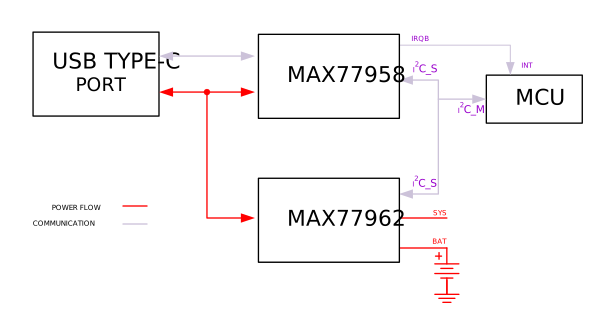
In the MCU based system (see Figure 2), the MCU controls the peripheral ICs. In response to port events, the MAX77958 interrupts the MCU and controls the MAX77958 and MAX77962 according to system needs.
Figure 2. MCU Based System
USB Type-C Interface and Control
The MAX77958 is a complete solution for USB port charger detection and High-Power USB charging on a single USB Type-C connector. It can also be used in any power sink or source application.
The USB Type-C is an internal block that detects connected accessories by using USB Type-C, USB PD messaging and USB BC1.2 charger detection. The USB Type-C block auto-configures switches for common connected accessories including USB cables (SDP/CDP/DCP).
CC/USB PD Interface
The MAX77958 works as a Dual Role Port (DRP) compliant to USB Type-C Version 1.3. The USB Type-C functions are controlled by a logic state machine which follows the USB Type-C requirements. There is support for the optional Try.Sink function which places priority on the sink role. This creates the appearance of legacy operation when the device is connected to another DRP. The IC automatically becomes a sink and draws power from the source. The IC firmware can optionally set an external charger's input current limit based on the current advertised on the CC lines through the master I2C interface.
USB Type-C Definitions
UFP—Upstream Facing Port. Typical USB device role for data transfer.
DFP—Down Stream Facing Port. Typical USB host role for data transfer.
DRP—Dual Role Port. USB Type-C port that can operate in either DFP or UFP roles.
Source—Initial power state for a DFP. Power role can be swapped by USB Power Delivery command.
Sink—Initial power state for a UFP. Power role can be swapped by USB Power Delivery command.
DRP
The USB Type-C connector management block supports DRP operation. The port cycles between advertising DFP/source and UFP/sink operations while waiting for a port to be connected. The internal state machine handles all the tasks of detecting and configuring the CC pins for the correct mode. A manual mode allows forcing either DFP or UFP operation in cases where the DRP operation is not appropriate
Detecting Connected DFP
When a DFP is detected (either from DRP mode or force UFP mode), the USB Type-C Connection State Machine detects the active CC line and reports this with an interrupt to the host application processor (AP). The AP then uses this information to de-mux the SuperSpeed USB lines as required. The USB Type-C Connection State Machine also auto detects the DFP advertised current (default, 1.5A and 3.0A). Upon detection of a change in the advertised current, an interrupt is sent to the AP.
Detecting Connected UFP
When a UFP is detected (either from DRP mode or force DFP mode), the USB Type-C State Machine detects the active CC line. If the Interrupt is enabled, and an AP is present, the IC toggles the INT line to report this to the host AP. Additionally, if an active cable is connected, the IC detects the presence of RA on the unconnected CC line to determine if it is necessary to turn on VCONN. The advertised initial supply current is the default USB current (500mA/900mA depending on if SuperSpeed is active). The advertised current can be changed through an I2C command or automatically to 1.5A. 3.0A is optionally available but is disabled by default.
Controls
Reported Status and Interrupts
Connected Device Detection
Active CC Line
VCONN Enabled (RA Present)
Advertised Current in UFP (Source) Mode
Error State
Operation Controls
Force Source (DFP) or Sink (UFP) State
Control Swap of Power Role or VCONN Role
Enable/Disable of Audio or Debug Accessories
Set Advertisement of CC Pin Current in Source Role
Try.SNK Support
The MAX77958 operates as a DRP by default. This type of port can act as either a Power Sink/USB Data Peripheral or a Power Source/USB Data Host. The USB Type-C logic state machine cycles between Source and Sink at a rate typically around 75ms. This means that when the IC is connected to another device, which is also a DRP (for example, PC with a C port), the source and sink roles are randomly assigned. The customer prefers that the mobile phone assumes the sink role if connected to a PC. The IC includes support for Try.SNK, which allows it to be set to strongly prefer the sink role if connected to a standard DRP. If two devices with Try.SNK enable are connected, the role setting is again random.
Audio Accessory Mode Support
The IC detects an audio accessory device when both the CC1 and CC2 pins are pulled down to ground by an RA resistor from the connected device.
DebugAcessory.SRC Support
The IC detects a connection to a debug and test system (DTS) when it operates in source power role. A debug accessory device is detected when the CC1 and CC2 pins are pulled down to ground by an RD resistor from the connected device.
DebugAcessory.SNK Support
The IC detects a connection to a DTS when it operates in sink power role. A debug accessory device is detected when the CC1 and CC2 pins are pulled up by an Rp resistor from the connected device.
The voltage levels on the CC1 and CC2 pins give the orientation and current capability.
Table 1. Rp/Rp Charging Current Values for a DTS Source
MODE OF OPERATION
CC1
CC2
Default USB Power
Rp for 3A
Rp for 1.5A
USB Type-C Current at 1.5A
Rp for 1.5A
Rp for Default
USB Type-C Current at 3A
Rp for 3A
Rp for Default
Moisture Detection
The MAX77958 features Moisture and Dry detection on the USB Type-C receptacle. When the Moisture detection feature is enabled (enabled as default), the MAX77958 is monitoring CC1/CC2 and SBU1/SBU2 for 1 DRP source cycle periodically. In case the impedance on these pins are less than Moisture threshold, the MAX77958 runs its unique algorithm until Dry is detected on the receptacle.
When Moisture and Dry are detected, the MAX77958 reports to the AP by setting CC_STATUS1[1].
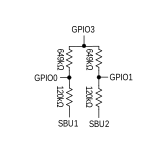
To take advantage of the MAX77958 Moisture detection feature, external resistor configuration on the SBU1 and SBU2 are required.
Figure 3. SBU Configuration
USB BC1.2 D+/D- Adapter Detection
Description
The USB adapter detection is USB BC1.2 compliant with the ability to automatically detect common charger types.
USB adapter detection has the following controls in the I2C register file:
Charger detection enable (ChgDetEn)
Charger detection manual—request a new run of charger detection (ChgDetMan)
The Adapter Detection State Machine follows USB BC1.2 requirements and detects SDP, CDP, and DCP types. If the D+/D- lines are detected as open, the adapter detection state machine indicates SDP as required by BC1.2 requirements.
With a USB BC1.2 compliant state machine, the IC reports that a DCP is detected based on the bias voltage. The IC default firmware can automatically set an external charger's input current limit based on the BC1.2 adapter type that was detected.
The IC also reports the operation status of the Adapter Detection State Machine in the ChgTypRun interrupt bit in the I2C register map.
Charger Type Detection Table
Table 2. BC1.2 Adapter Detection
USB BC1.2 DETECTED ADAPTER TYPE
ChgTyp VALUE
CHARGER DETECTED
00
No VBUS
01
SDP
10
CDP
11
DCP
Note: Adapter Detect running state is indicated until the Adapter Detection State Machine is complete.
VCONN Switch
Description
The MAX77958 integrates the VCONN switch which connects VCIN to one of CC1 and CC2. Once CC detection identifies Ra/Ra on CC1 and CC2, the VCONN switch routes VCIN to the pin that is not connected to the CC line in the cable.
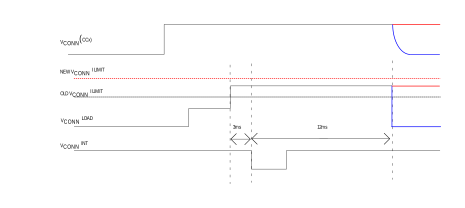
The MAX77958 also provides programmable VCONN switch current limit from 200mA to 500mA in 100mA step. If VCONN load current exceeds the current limit for 3ms, then an interrupt is generated to the Application Processor (AP). If AP wants to keep supplying VCONN power, then the AP must configure a higher current limit or no current limit within 12ms. If not, the VCONN switch is turned OFF in 12ms after an Interrupt is generated.
Figure 4. VCONN Overcurrent Protection Operation
USB Type-C Interface and Control
Automatic Accessory Detection
Autoconfiguration Details
CCDetEn = 0 or ChgDetEn = 0
1. Nothing happens when VBUS is attached. Nothing occurs when ChgDetMan is set to 1.
CCDetEn = 1 and ChgDetEn = 1
Charger detection runs automatically when VBUS is attached
If VBUS voltage enters the valid range, all switches connected to DP/DN are opened
Charger detection algorithm begins.
When charger detection finishes, DP/DN switch settings are restored.
USBAuto = 0
1. No automatic switch configuration happens
USBAuto = 1
Operates only after charger detection completes, SDP or CDP is found, and if no special charger is found (SpChgTyp = 000 unknown).
Set DP/DN connected to DP2/DN1, over-riding any previous switch setting.
At any time, the AP is allowed to change these switch settings.
If AP has not changed the switch settings when VBUS drops below the valid level, DP/DN sets to Hi-Z.
USB Power Delivery
Description
The IC supports USB Power Delivery Revision 3.0. The power delivery subsystem is separated into 2 parts: Automatic Power Control and Application Processor Message Passthrough.
Application Processor Message Passthrough
There are many USB PD messages that are unrelated to power control. These messages pass on to the AP to decode and reply. USB PD messages have time critical components and the IC automatically handles these time critical events.
IC Wakeup events
The IC automatically operates in the lowest possible power state. The IC power consumption depends on the following conditions:
Request has been made across the I2C bus
USB Type-C end-to-end detection is valid
VBUS is present
The lowest possible power consumption state is no VBUS, CCDetEn = 0, and no I2C traffic requests.
Interrupt Output (INTB)
INTB is an open-drain and active-low output. It reports an interrupt event to the main microprocessor. Individual interrupt sources can be masked. Once the main microprocessor reads the interrupt registers, the INTB pin is cleared.
Interconnected Block Diagram
Figure 5. Interconnected Block Diagram
System Faults
The IC monitors the system for the following faults:
Undervoltage lockout
VIO fault
Undervoltage Lockout
When the VAVL falls below AVLUVLOF (2.6V max) for more than 8ms, the MAX77958 enters into a shutdown state. Once the VAVL voltage is higher than AVLUVLOR (2.8V max), the MAX77958 exits shutdown state to be functional.
VIO Fault
When VIO1 and VIO2 fall below 1.0V, the IC goes into shutdown state. Once VIO1 and VIO2 voltages rise higher than 1.3V, the IC comes out of shutdown state.
Reset Conditions
The IC has different levels of reset as follows:
Type S: Registers are reset each time when VDD1P8 < VDD_OKF
Type O: Registers are reset each time when VDD1P8 < VDD_OKF or when the software reset command is transmitted (SW_RESET = 0x0F)
WDT Reset
1. Firmware restarts a watchdog timer in 1.86s.
2. If the watchdog timer is not kicked in 1.86s, it executes the following actions:
a.) MAX77958 reboots
b.) MAX77958 notifies MA_SYSERROR_BOOT_WDT
I2C Serial Interface
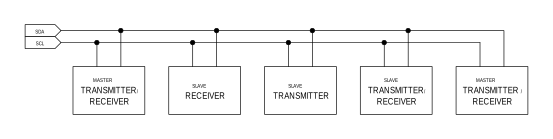
The I2C serial bus consists of a bidirectional serial-data line (SDA) and a serial clock (SCL). I2C is an open-drain bus. SDA and SCL require pullup resistors (500Ω or greater). Optional 24Ω resistors in series with SDA and SCL help to protect the device inputs from high voltage spikes on the bus lines. Series resistors also minimize crosstalk and undershoot on bus lines.
System Configuration
The I2C bus is a multi-master bus. The maximum number of devices that can attach to the bus is only limited by bus capacitance.
Figure 6 shows an example of a typical I2C system. A device on the I2C bus that sends data to the bus is called a transmitter. A device that receives data from the bus is called a receiver. The device that initiates a data transfer and generates SCL clock signals to control the data transfer is a master. Any device that is being addressed by the master is considered a slave. When the MAX77958 I2C-compatible interface is operating, it is a slave on the I2C bus and it can be both a transmitter and a receiver.
Figure 6. Functional Logic Diagram for Communications Controller
Bit Transfer
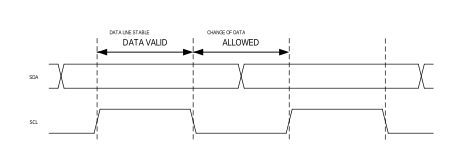
One data bit is transferred for each SCL clock cycle. The data on SDA must remain stable during the high portion of the SCL clock pulse. Changes in SDA while SCL is high are control signals (START and STOP conditions).
Figure 7. I2C Bit Transfer
START and STOP Conditions
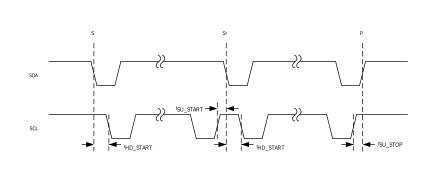
When the I2C serial interface is inactive, SDA and SCL idle high. A master device initiates communication by issuing a START condition. A START condition is a high-to-low transition on SDA with SCL high. A STOP condition is a low-to-high transition on SDA, while SCL is high.
A START condition from the master signals the beginning of a transmission to the IC. The master terminates transmission by issuing a NOT ACKNOWLEDGE followed by a STOP condition.
A STOP condition frees the bus. To issue a series of commands to the slave, the master can issue REPEATED START (Sr) commands instead of a STOP command in order to maintain control of the bus. In general, a REPEATED START command is functionally equivalent to a regular START command.
When a STOP condition or incorrect address is detected, the IC internally disconnects SCL from the I2C serial interface until the next START condition, minimizing digital noise and feed-through.
Figure 8. I2C Start and Stop
Acknowledge
Both the I2C bus master and the IC (slave) generate acknowledge bits when receiving data. The acknowledge bit is the last bit of each nine bit data packet. To generate an ACKNOWLEDGE (A), the receiving device must pull SDA low before the rising edge of the acknowledge-related clock pulse (ninth pulse) and keep it low during the high period of the clock pulse. To generate a NOT-ACKNOWLEDGE (nA), the receiving device allows SDA to be pulled high before the rising edge of the acknowledge-related clock pulse and leaves it high during the high period of the clock pulse.
Monitoring the acknowledge bits allows for detection of unsuccessful data transfers. An unsuccessful data transfer occurs if a receiving device is busy or if a system fault has occurred. In the event of an unsuccessful data transfer, the bus master should reattempt communication at a later time.
Slave Address
The IC acts as a slave transmitter/receiver. The slave address of the IC is 0x4Ah/0x4Bh,0x4Ch/0x4Dh and 0x4Eh/0x4Fh depending on configuration of GPIO6.The least significant bit is the read/write indicator (1 for read, 0 for write).
Table 3. I2C Slave Address
GPIO6
SLAVE ADDRESS (7-BIT)
SLAVE ADDRESS (WRITE)
SLAVE ADDRESS (READ)
GND
010 0101
0x4A (0100 1010)
0x4B (0100 1011)
Pullup (470kΩ ±10%) to VIO1
010 0110
0x4C (0100 1100)
0x4D (0100 1101)
Pulldown (470kΩ ±10%) to GND
010 0111
0x4E (0100 1110)
0x4F (0100 1111)
Clock Stretching
In general, the clock signal generation for I2C bus is the responsibility of the master device. I2C specification allows slow slave devices to alter the clock signal by holding down the clock line. The process in which a slave device holds down the clock line is typically called clock stretching. The IC does not use any form of clock stretching to hold down the clock line.
General Call Address
The IC does not implement an I2C specification general call address. If the IC sees general call address (00000000b), it does not issue an ACKNOWLEDGE (A).
Communication Speed
The IC provides I2C 3.0-compatible (1MHz) serial interface.
I2C Revision 3 Compatible Serial Communications Channel
0Hz to 100kHz (Standard Mode)
0Hz to 400kHz (Fast Mode)
0Hz to 1MHz (Fast-Mode Plus)
Does not Support I2C Clock Stretching
Operating in standard mode, fast mode, and fast-mode plus does not require any special protocols. The main consideration when changing the bus speed through this range is the combination of the bus capacitance and pullup resistors. Higher time constants created by the bus capacitance and pullup resistance (C x R) slow the bus operation. Therefore, when increasing bus speeds the pullup resistance must be decreased to maintain a reasonable time constant. Refer to the “Pullup Resistor Sizing” section of the I2C revision 3.0 specification for detailed guidance on the pullup resistor selection. In general, for bus capacitance of 200pF, a 100kHz bus needs 5.6kΩ pullup resistors, a 400kHz bus needs about 1.5kΩ pullup resistors, and a 1MHz bus needs 680Ω pullup resistors. Note that the pullup resistor dissipates power when the open-drain bus is low. The lower the value of the pullup resistor, the higher the power dissipation (V2/R).
Operating in high-speed mode requires some special considerations. For the full list of considerations, see the I2C 3.0 specification. The major considerations with respect to the IC are:
I2C bus master uses current source pullups to shorten the signal rise times.
I2C slave must use a different set of input filters on its SDA and SCL lines to accommodate for the higher bus speed.
The communication protocols need to utilize the high-speed master code.
At power-up and after each STOP condition, the IC input filters are set for standard mode, fast mode, or fast-mode plus (i.e., 0Hz to 1MHz). To switch the input filters for high-speed mode, use the high-speed master code protocols that are described in the Communication Protocols section.
Communication Protocols
The IC supports both writing and reading from its registers.
Writing to a Single Register
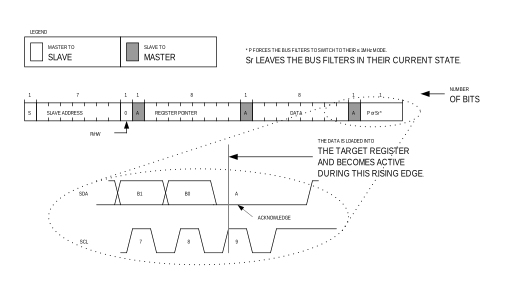
Figure 9 shows the protocol for the I2C master device to write one byte of data to the IC. This protocol is the same as SMBus specification’s “Write Byte” protocol.
The “Write Byte” protocol is as follows:
The master sends a START command (S).
The master sends the 7-bit slave address followed by a write bit (R/W = 0).
The addressed slave asserts an ACKNOWLEDGE (A) by pulling SDA low.
The master sends an 8-bit register pointer.
The slave acknowledges the register pointer.
The master sends a data byte.
The slave acknowledges the data byte. At the rising edge of SCL, the data byte is loaded into its target register and the data becomes active.
The master sends a STOP condition (P) or a REPEATED START condition (Sr). Issuing a P ensures that the bus input filters are set for 1MHz or slower operation. Issuing a REPEATED START (Sr) leaves the bus input filters in their current state.
Figure 9. Writing to a Single Register
Writing to Sequential Registers
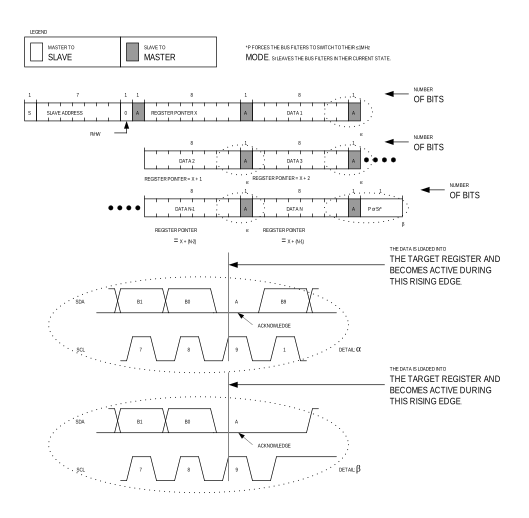
Figure 10 shows the protocol for writing to sequential registers. This protocol is similar to the “Write Byte” protocol, except the master continues to write after it receives the first byte of data. When the master is done writing, it issues a STOP or REPEATED START.
The “Writing to Sequential Registers” protocol is as follows:
The master sends a START command (S).
The master sends the 7-bit slave address followed by a write bit (R/W = 0).
The addressed slave asserts an ACKNOWLEDGE (A) by pulling SDA low.
The master sends an 8-bit register pointer.
The slave acknowledges the register pointer.
The master sends a data byte.
The slave acknowledges the data byte. At the rising edge of SCL, the data byte is loaded into its target register and the data becomes active.
Steps 6 to 7 are repeated as many times as the master requires.
During the last acknowledge related clock pulse, the slave issues an ACKNOWLEDGE (A).
The master sends a STOP condition (P) or a REPEATED START condition (Sr). Issuing a P ensures that the bus input filters are set for 1MHz or slower operation. Issuing a REPEATED START (Sr) leaves the bus input filters in their current state.
Figure 10. Writing to Sequential Registers
Reading from a Single Register
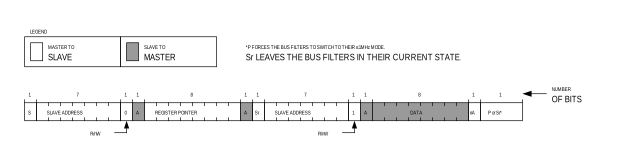
The I2C master device reads one byte of data to the IC. This protocol is the same as SMBus specification’s “Read Byte” protocol.
The “Read Byte” protocol is as follows:
The master sends a START command (S).
The master sends the 7-bit slave address followed by a write bit (R/W = 0).
The addressed slave asserts an ACKNOWLEDGE (A) by pulling SDA low.
The master sends an 8-bit register pointer.
The slave acknowledges the register pointer.
The master sends a REPEATED START command (Sr).
The master sends the 7-bit slave address followed by a read bit (R/W = 1).
The addressed slave asserts an ACKNOWLEDGE (A) by pulling SDA low.
The addressed slave places 8-bits of data on the bus from the location specified by the register pointer.
The master issues a NOT-ACKNOWLEDGE (nA).
The master sends a STOP condition (P) or a REPEATED START condition (Sr). Issuing a P ensures that the bus input filters are set for 1MHz or slower operation. Issuing a REPEATED START (Sr) leaves the bus input filters in their current state.
Figure 11. Reading from a Single Register
Reading from Sequential Registers
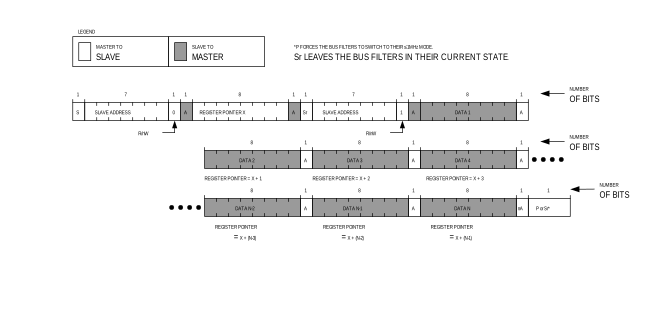
Figure 12 shows the protocol for reading from sequential registers. This protocol is similar to the “Read Byte” protocol except the master issues an ACKNOWLEDGE (A) to signal the slave that it wants more data—when the master has all the data it requires, it issues a NOT-ACKNOWLEDGE (nA) and a STOP (P) to end the transmission.
The “Continuous Read from Sequential Registers” protocol is as follows:
The master sends a START command (S).
The master sends the 7-bit slave address followed by a write bit (R/W = 0).
The addressed slave asserts an ACKNOWLEDGE (A) by pulling SDA low.
The master sends an 8-bit register pointer.
The slave acknowledges the register pointer.
The master sends a REPEATED START command (Sr).
The master sends the 7-bit slave address followed by a read bit (R/W =1).
The addressed slave asserts an ACKNOWLEDGE (A) by pulling SDA low.
The addressed slave places 8-bits of data on the bus from the location specified by the register pointer.
The master issues an ACKNOWLEDGE (A) signaling the slave that it wishes to receive more data.
Steps 9 to 10 are repeated as many times as the master requires. Following the last byte of data, the master must issue a NOT-ACKNOWLEDGE (nA) to signal that it wishes to stop receiving data.
The master sends a STOP condition (P) or a REPEATED START condition (Sr). Issuing a STOP (P) ensures that the bus input filters are set for 1MHz or slower operation. Issuing a REPEATED START (Sr) leaves the bus input filters in their current state.
Figure 12. Reading from Sequential Registers
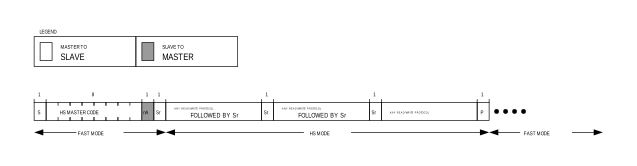
Engaging HS-Mode for Operation up to 3.4MHz
Figure 13 shows the protocol for engaging HS-Mode operation. HS-Mode operation allows for a bus operating speed up to 3.4MHz.
The “Engaging HS-Mode” protocol is as follows:
Begin the protocol while operating at a bus speed of 1MHz or lower.
The master sends a START command (S).
The master sends the 8-bit master code of 0000 1xx0b, where ‘xx’ are don’t care bits.
The addressed slave issues a NOT-ACKNOWLEDGE (nA).
The master may now increase its bus speed up to 3.4MHz and issue any read/write operation.
The master may continue to issue high-speed read/write operations until a STOP (P) is issued. Issuing a STOP (P) ensures that the bus input filters are set for 1MHz or slower operation.
Figure 13. Engaging HS-Mode
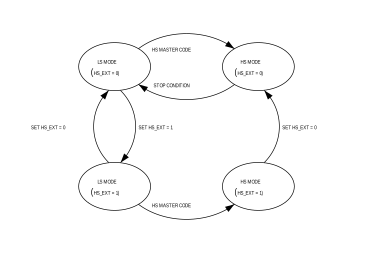
The MAX77958 I2C supports the HS mode extension feature. The HS extension feature keeps the high-speed operation even after a ‘STOP’ condition. This eliminates the need for HS master code issued by the I2C master controller when the I2C master controller wants to stay in HS mode for multiple read/write cycles.
As shown in Figure 14, the HS extension mode can be enabled by setting HS_EXT bit in I2C_CFG register (ADDR 0x15) from LS mode only (entering HS extension mode from HS mode is not supported).